
Our Software
Seaquake techno rumble plugin features
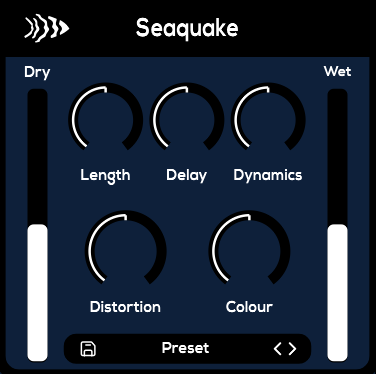
Seaquake adds depth and power to kick drums with a streamlined interface built for techno, warehouse, and bass music. Dial in a resonant rumble in seconds, from tight pulses to earth-shaking tails without stacking multiple plugins.
Length
Balance short, percussive tails with long cinematic decay to match the energy of the track.
Delay
Lock the rumble to your groove so the low-end reinforces the beat without muddying it.
Dynamics
Control the weight of the rumble, from subtle warmth to crushing subs that dominate the mix.
Distortion
Add harmonics and grit to push Seaquake from velvet smooth to aggressive rave textures.
Colour
Shape tone with tilting filters so the rumble fits techno, breaks, or halftime moods.
Audio Demo
Hear the rumble
Click on the sound animations to hear a demo of the Seaquake techno rumble plugin, or watch the tutorial video to see how the free VST3/AU/AAX sounds inside a DAW.
Tech Specs
Ready for modern studios
Seaquake slots into the most common production setups with native support for VST3, AU, and AAX hosts. Update the specs whenever new builds or DAWs are supported.
Operating Systems
macOS 10.13+ (Apple Silicon & Intel)
Windows 10 (64-bit)
Formats
VST3, AU, and AAX installers included.
Standalone build planned.
DAWs
Tested in Ableton Live, FL Studio, Logic Pro, Bitwig, and Studio One. Most VST3/AU hosts are supported.
Requirements
4 GB RAM recommended, 200 MB disk space, internet for activation.
FAQ
Common questions
Update or add more questions as you collect feedback from Seaquake users.
How do I install Seaquake?
Download the installer for your OS, run it, and open the plugin in your DAW. Seaquake will prompt you to sign in the first time.
Is Seaquake compatible with Apple Silicon?
Yes. The macOS build ships as a universal binary that runs natively on Apple Silicon and Intel systems.
Is Seaquake free forever?
Yes! Seaquake is completely free forever. When downloading, you have the option to make a voluntary donation to support our small developer team and help us create more awesome plugins.
Support
We are here to help
If you have found a bug, need help with a plug-in, or want to talk about licensing, send us a note. We read every message.
Join the community
Stay in the loop
Learn about new plugins, limited drops, and discount codes before anyone else.